How We Built the Upcoming Changes System for Gradual Product Rollouts in Discourse
How Discourse built a system to roll out product changes without breaking anyone's forum - and why the answer was hiding in the codebase the whole time.

Discourse is heavily customizable community software, with many configurations and variations of the interface based on user permissions and other functionality. This makes it hard to predict the ways a product change might take site owners or their members by surprise, especially on sites with many customizations or bespoke themes.
We have always used feature flags to control the rollout of changes in Discourse, but these have not always been obvious; which means admins were often not aware of them until they were already enabled or removed, at which point it was too late...
We wanted to find a way to reduce the risk of surprises and breakages for all Discourse sites while still being able to improve our product and communicate exciting changes that are coming so adventurous admins can opt-in early, giving them more time to test and prepare before product changes become permanent. This also lets our product development teams move fast and experiment freely, without breaking things.
Enter the upcoming changes system, a new way of informing admins of new features and changes to existing functionality that lets us innovate and improve our product continually with stability in mind.
How does it work?
All Discourse sites will now have an upcoming changes page accessible from the admin UI. You can see what it looks like below:
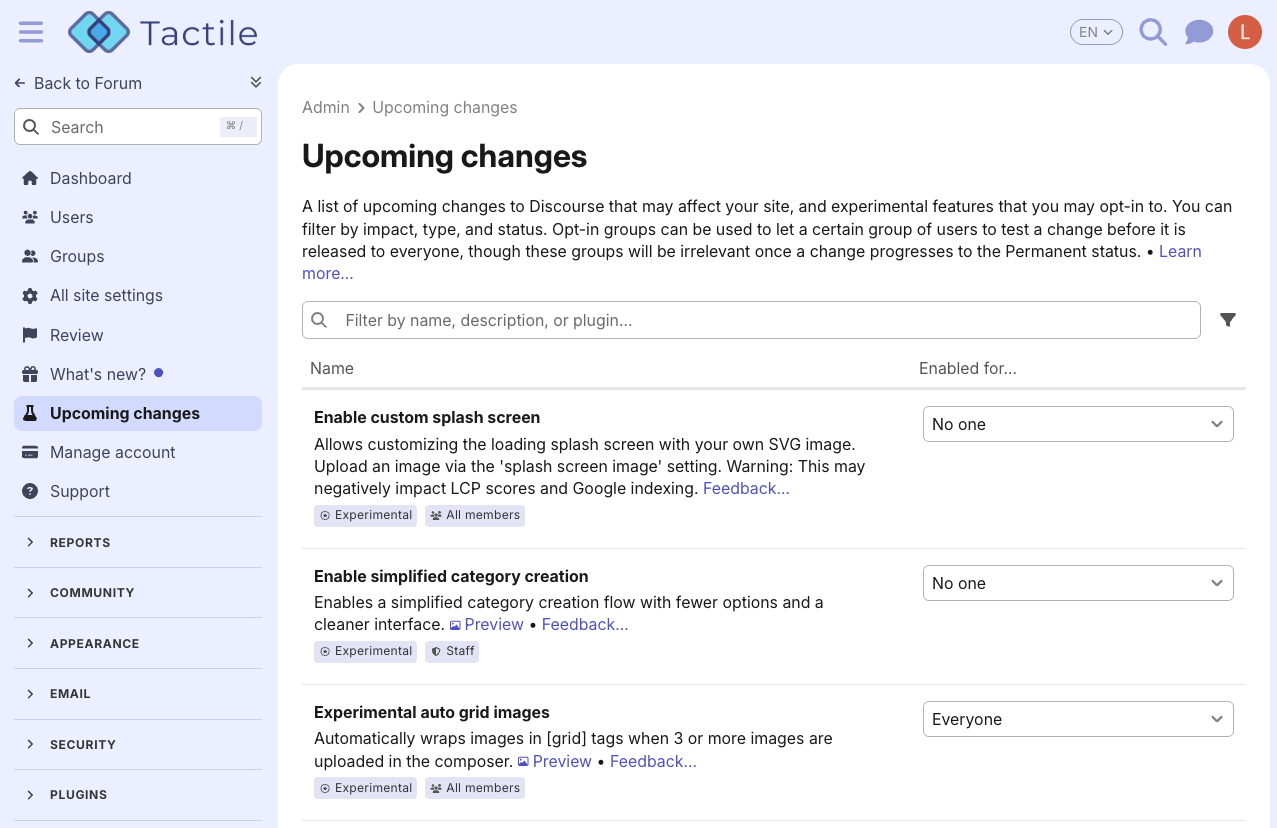
Each change has a status, a description, who will be impacted, a link to a feedback topic on Discourse Meta, and optionally a preview image. Admins can choose to opt-in to a change at any time, even restricting it to specific groups on the site if a trusted set of early adopters are used for testing.
However, as the status progresses from Experimental, to Alpha, and all the way along to Stable and Permanent, we will automatically enable the change for the site, and inform admins about it along the way. For more details about how the system works, see the announcement topic on Discourse Meta .
How did we make it?
From here, we can follow the story of how a large product change is planned and executed within Discourse, especially one that crosses multiple teams and roles. Along the way, we will go over some technical details and challenges that we encountered, and cover the evolution of the upcoming change feature since development started in August 2025.
Inception and private RFC
The way this project started was fairly serendipitous. I had gone to visit my colleague Joffrey Jaffeux and stay with him in Montpellier in the two weeks previous to our Prague meetup last year. We were looking for a project to work on together, and the issues around velocity and safely making changes to the Discourse product were coming up again and again over the preceding months.
So, while we walked to the River Lez for one of our runs, we started to bounce some ideas off one another on how the system might work, and then over the next few days we discussed it with Sam Saffron our CEO, Lindsey Fogle our product manager, and David Taylor the tech lead of the dev experience team. The response was generally positive, and the next step was clarifying our thinking and casting a broader net for feedback.
After this, we began with a personal message to a select group with a detailed RFC (request for comment) on how the system would work, which was helpful to write up at the time to get our thinking clear and describe the ins-and-outs of the system. Writing is thinking, so this process brought up many questions that we needed to find answers for. Over time the personal message grew with participants from various departments and roles in the company, such as the customer projects team, dev managers, engineers, and product managers.
One of the main pieces of feedback here came down to how we classified upcoming changes. In the original proposal, we had both a Risk (e.g. High, Medium, and Low) and a Type defined for each change. However the concern with Risk was that every site owner and admin may have different Risk definitions and tolerances. What we consider Low risk may well be considered High risk to someone else, causing mismatched expectations, and vice-versa classifying something as High risk may cause admins to be extremely hesitant to enable the change.
In the end we settled on Impact, proposed by Mark VanLandingham of the customer projects team, which combines Type and an indication of who the change will impact, which we are calling Roles. So you may have a change which is a feature which impacts only admins, or all members, or another change which only impacts theme developers.
From these conversations, we had our initial direction, as well as some idea of how we might approach implementation. For this system, instead of building something completely new, we would piggyback on our existing and robust site settings, which had a lot of the tooling we already needed anyway.
Site settings, how do they work?
I’d like to take a step back for a moment and explain how our site setting system works. If you’ve ever configured a Discourse forum, you will have used this system, either through the big list of all site settings or the newer config pages where we embed relevant settings directly:
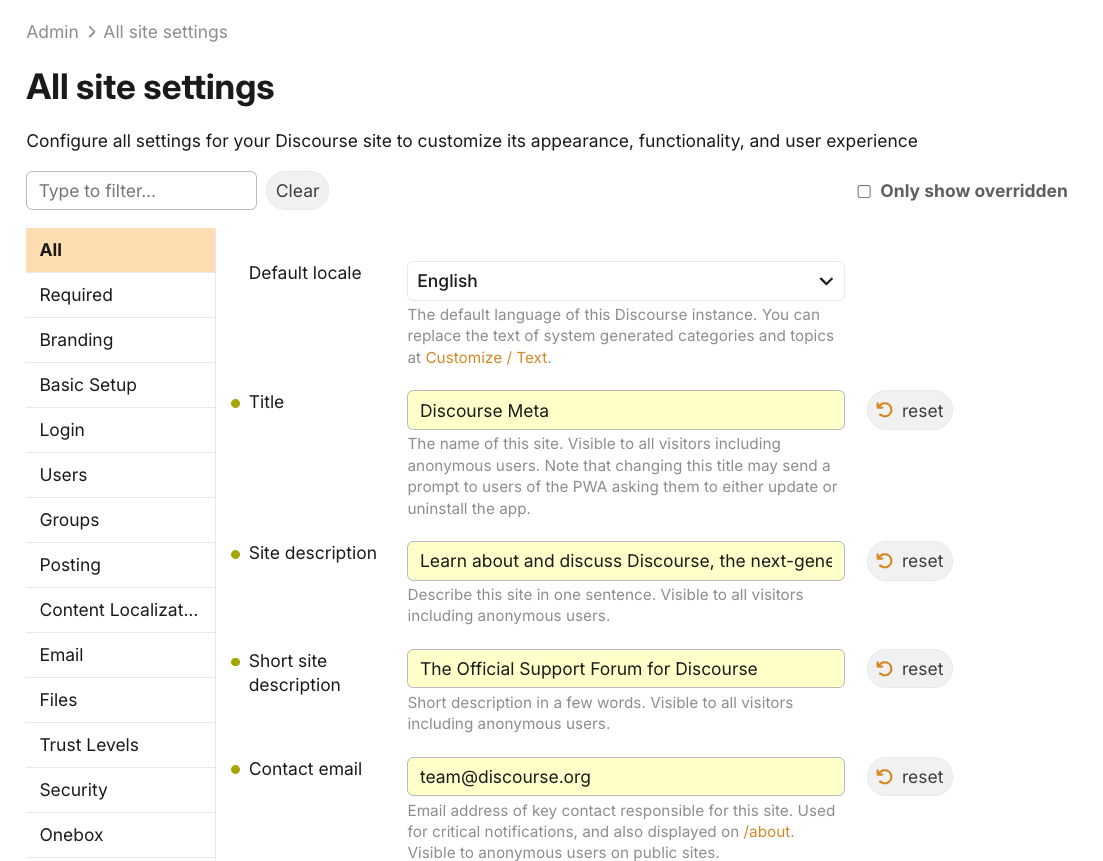
There are many types of site settings, from basic text and number inputs, to dropdowns, to uploads. All of the settings are defined in a site_settings.yml file inside the Discourse core repo, and any plugin can define them too. There is tons of metadata you can attach to each setting – defining whether it’s hidden or visible, if it has special validation, minimums and maximums, whether it’s usable in the user interface or just on the server-side, and so on. Every setting has a default value which the admin can override.
These settings are loaded into memory when the application boots up, and their values are synced across every process running for the server. When an admin changes the value in the interface, we save the value to the database, then have to update the in-memory value for every server process running in the background, as well as sending the new value to all user’s web browsers using a library called MessageBus . This lets the UI change reactively based on the site settings.
Here's a basic diagram showing how the propagation works:
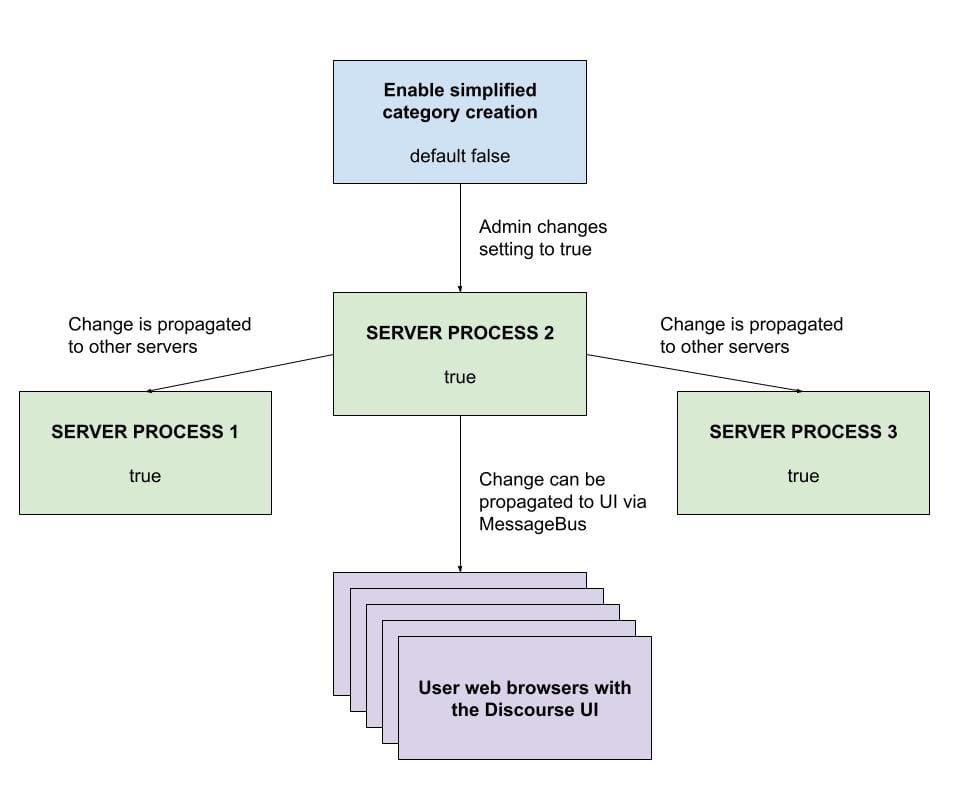
All of this functionality combined lets us easily control the UI of a Discourse site through declarative configuration that admins can override to suit their needs. This was an ideal system for upcoming changes to piggy-back onto. All we did was add a few pieces of metadata to a setting (like the status and the learn more URL) and we had a robust system that we could present to admins in a simple user interface for upcoming changes.
Company-wide RFC
Okay, back to the development story. After our private RFC and discussion, the time came to make a company-wide RFC, which we often do in our internal Discourse site’s Product category. This gives a chance for different people across our product, engineering, design, and other departments to have input
Initially, a basic UI for demonstration of the system was whipped up using our admin user interface guidelines and reusable components that the former staff experience team created. This was good enough for a first pass, but the page definitely needed some love. One of our senior designers, Kris Aubuchon, stepped in to make some improvements.
Before:

After:
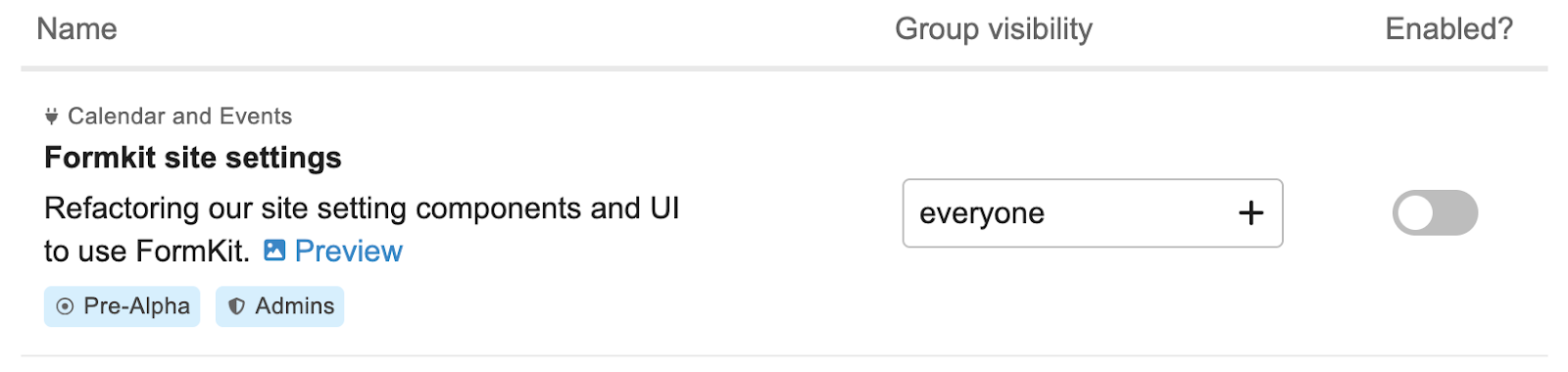
Kris moved the badges out of a standalone column and into the main Name column, making the colours more pleasing. The [...] menu was done away with. It contained the Preview and group selection interfaces, both of which were moved inline. The page became more balanced and easier to use without going into a modal. Eventually, the design coalesced into the final state seen today in the admin interface, where Enabled is a dropdown which incorporates both on/off states and specific group selection for a change.
Final design:

One major change that happened during the company-wide RFC was how the upcoming changes would be automatically turned on for admins. Initially, we proposed that there would be a promotion version for the change, and that statuses were more of a visual indication of how far along a change was, similar to Basecamp's hill charts.
The main problem identified here by our director of product, Dave McClure, was that promotion version is quite a hard thing to predict for any given change, and that status may give enough of an indicator on how ready a change is anyway. So, we decided to drop it for status-only, and after some further discussion with Lindsey we reached the final version of how promotions will work, which is that for each site a promotion version can be defined in a hidden site setting.
For our hosting, we set these by subscription tier for consistency, and to give ourselves a smooth rollout path, with our hosted sites on Starter for example getting changes much earlier in the status progression than our Enterprise customers. During this discussion we also pivoted from the initial status being called Pre-Alpha to Experimental.
Doing this lets us use this system for experiments as well as changes we are completely sure will make it all the way through to Permanent, and Experimental changes may or may not be something that we want to continue with, but are still useful to allow a wide audience to opt-in to if they wish.
The promotion and notification system
As development progressed, there was one last important milestone that needed to be completed before we could roll out the upcoming change system to all our customers – the system which would be used to notify admins of new changes, and of changes that had been automatically promoted based on status. We notify admins of new upcoming changes once they reach the promotion status minus one. So for example on our Pro sites, we notify admins once a change reaches the Alpha status, since they are promoted on Beta.
Initially, the way I approached this was to use a Ruby on Rails initializer to detect when upcoming changes were available or promoted on site boot, then go through and send notifications to all of the site’s admins. I introduced a new database table to keep track of when a site first detected these upcoming changes based on site setting config, among other events, since the site setting yaml file was ever-changing. I went this way at first because I was initially reluctant to do too much work in background jobs.
However, upon review by David Taylor and Loïc Guitaut on the developer experience team, there were several cracks in the facade identified. The problems they found with doing this in initializers were:
- Calling the database during Rails initializers can slow down the site, and we also have to deal with read-only mode in this case
- We have a blue-green deployment system, where two sites can boot different versions of the site at the same time, so some admins may land on the new version and be notified while others land on the old version and are not notified
- Our sites have multiple processes running for the same site, so we have to make sure we didn’t repeat the same work multiple times
Taking in this feedback, I made a couple of big refactors to the system, utilizing the claude code CLI to move things around and fix up automated specs. Instead of updating the backing setting for the upcoming change in the database, we would instead have a “virtual” setting that reports that it is enabled if the change has reached its status threshold, or will report the database value if the admin toggles the feature on or off manually.
I also moved the upcoming change status detection and related notifications to run in a background job that runs every 20 minutes. These notifications are not time-critical, so having a small delay to get around the boot issues was not a big deal.
In the end, we are left with a simple system to follow that keeps admins up to date without having to deal with a bunch of technical challenges and edge cases.
The future
Now you’ve seen a glimpse into the internal development lifecycle of a system which affects many teams and departments across Discourse! The upcoming changes system is already deployed to all Discourse hosted sites, any of our customers who are site admins can visit /admin/config/upcoming-changes to see them.
We are already using the upcoming changes system for some exciting new developments, such as simplified category setup , modernizing the Foundation theme, and allowing custom SVG images on the splash screen . We have some further improvements for the system up our sleeve, like a deeper merging between this system and the existing “What’s new?” admin UI.
As we roll out changes we welcome feedback from site admins, since the more we exercise upcoming changes, the better we can make the system. Each change has a dedicated Meta topic to post in if bugs are encountered or admins have any ideas or questions about the change. For general feedback about the system, visit the topic on Meta!
Comments