Introducing Discourse Workflows
If your community is drowning in manual work, here's the fix!


Community management has always involved a category of work that nobody wants to talk about - the repetitive and often mechanical overhead that accumulates in every active community and consumes the time you were supposed to spend on work that actually matters: helping and connecting people.
Instead of nurturing your community, you wind up spending three hours configuring a webhook chain to save ninety minutes a month, and learning a proprietary scripting language to automate something that should have been a checkbox.
Worse: you have to maintain the automations when they break, debug them when they fail, and wrangle a growing tech debt you never signed up for.
Better: we’re excited to announce our new product feature in Discourse, built to add first-class automation capabilities that admins can actually use, maintain, and trust.
We call it Workflows!
What we’ve built…
Workflows is a visual automation builder, now available on Business and Enterprise plans.
It replaces the need for fixed scripts with building blocks: four kinds of nodes - triggers, conditions, actions, and utilities - can be connected in any configuration on a drag-and-drop canvas.
The language here will be familiar if you've used tools like Zapier or n8n. A trigger starts the workflow: a topic gets created, a user is added to a group, a schedule fires, a webhook arrives, or you kick it off manually. Conditions route the flow based on logic - yes or no, this branch or that one. Actions make things happen: post a reply, send a private message, grant a badge, call an external API, run an AI agent. Utilities manage the flow itself, with delays, loops, and variable assignments.
Data passes between nodes as JSON that you can inspect and reference. Node fields can contain a fixed value or a dynamic expression that draws on the current item, an earlier node's output, workflow variables, site settings, or execution context. The expression picker lets you insert those references without memorizing the syntax.
Instead of picking from a menu of pre-built automations, you can build the automation your community actually needs from general-purpose pieces.
What that looks like in practice
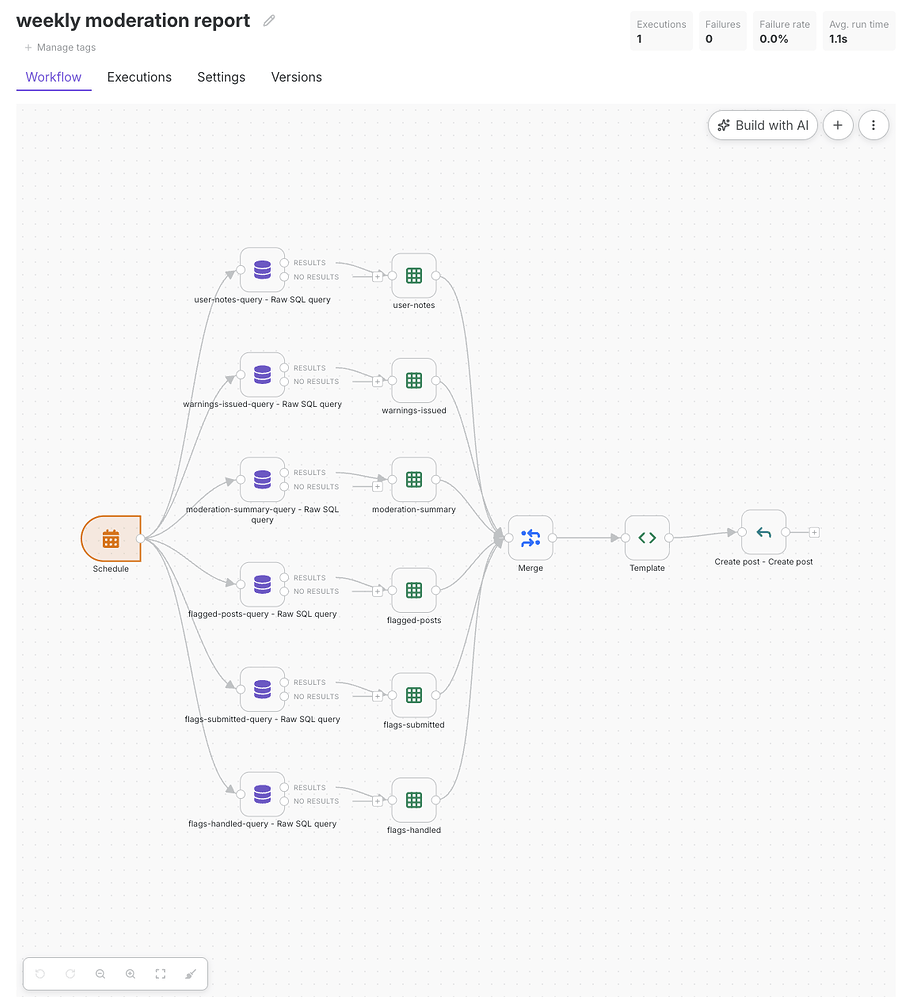
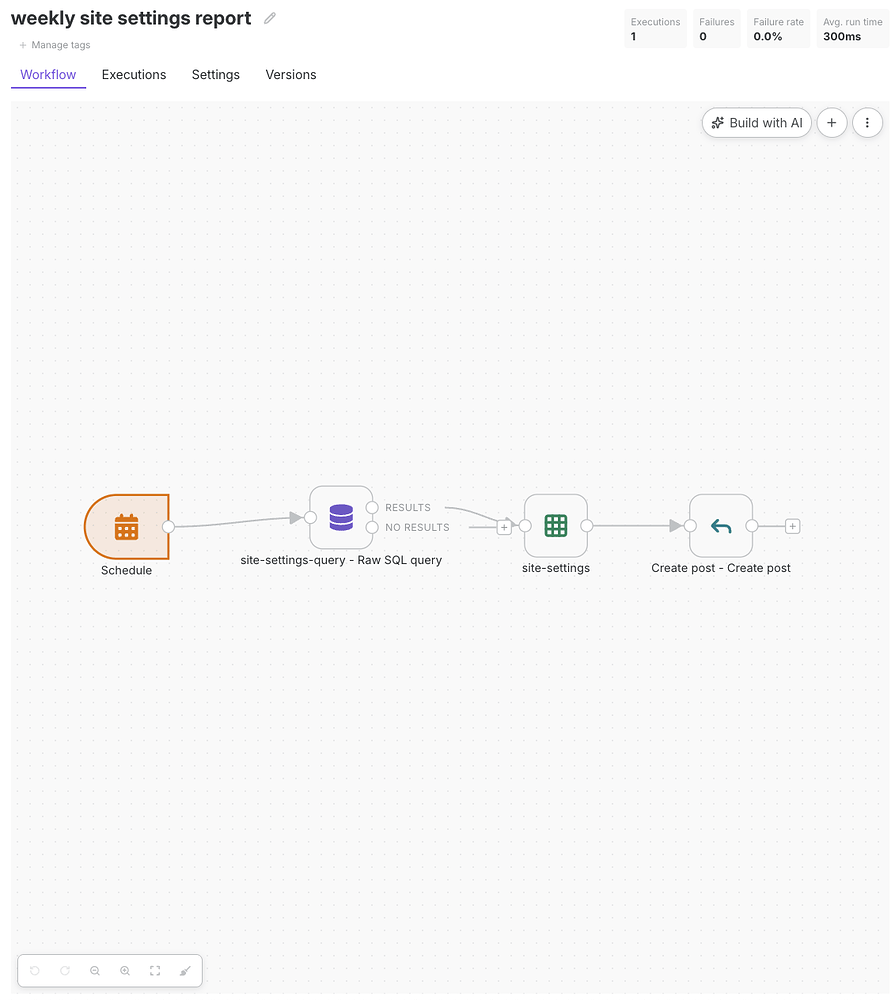
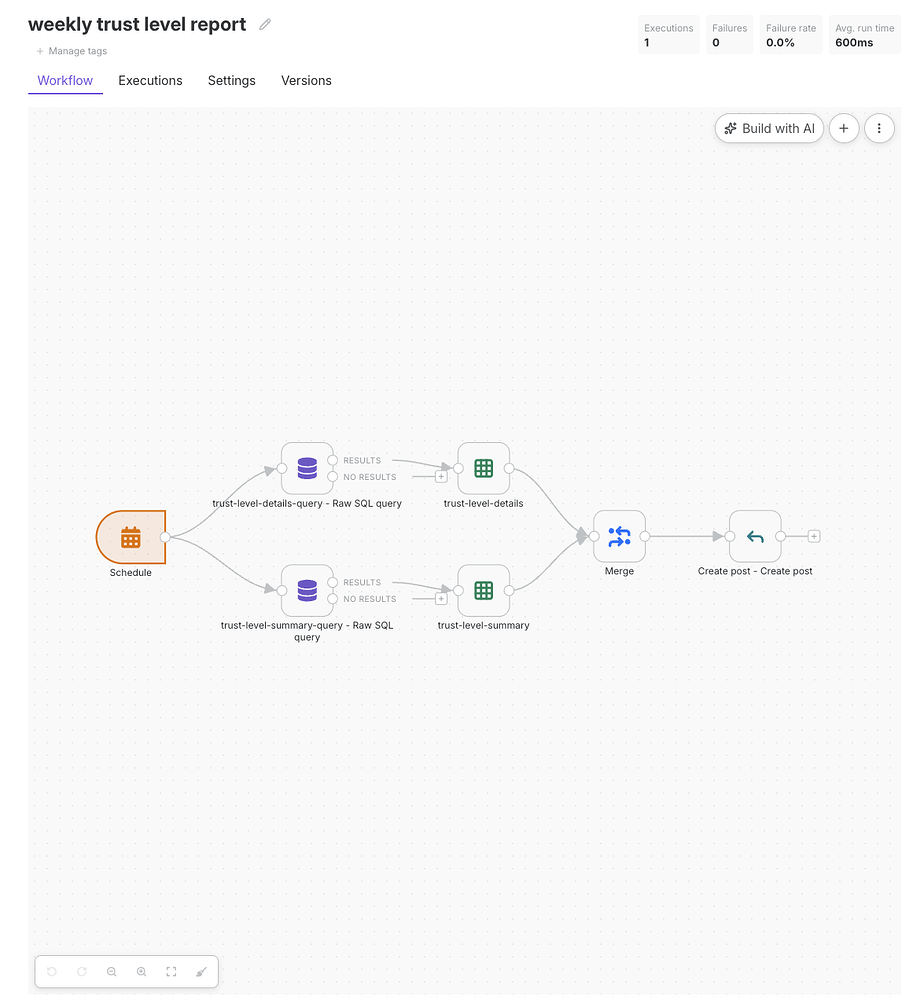
We use Workflows on Meta (our Discourse community) to automate three vital weekly staff reports. Powered by the basic components described earlier, a scheduled trigger automatically compiles the week’s activity into tables and publishes it directly to our staff category. The process is completely hands-off, ensuring our team has reliable, instant access to the data they need without any manual legwork.
The weekly moderation report is the most detailed of the three. It posts a set of tables covering the week's moderation activity: a summary with counts of each moderation action; who handled flags and who reported them; the flagged posts themselves with their metadata; any warnings issued; and any user notes added. It puts the full moderation picture for the week in one place.
The weekly site settings report is the simplest: a single table of every site setting that changed during the week, showing the setting name, who changed it and when, and the old and new values. It works as a running audit trail of configuration changes, posted where every admin will see it.
The weekly trust level report tracks how members are progressing through the community. It opens with a summary of how many users were promoted to each trust level that week, followed by a list of the users who reached trust level 2 or 3, so the team can see who's stepping up.
These sample Workflows use the same triggers, actions, and utilities you'd use for anything else. We've exported the JSON for all three above; you can import them, change the topic ID in the final node to a topic in your own staff category, and you'll have the same report running on your own site. (We replaced our topic IDs with TOPIC_ID before sharing, so edit the file before you import it!)
The infrastructure that makes it maintainable
The canvas is the part that's easy to show in a screenshot, but we’re even more excited about the infrastructure that makes Workflows the most reliable, fully featured option for Discourse community managers:
Variables are key-value pairs you define once and reference anywhere with {{ $vars.key_name }}. Instead of hard-coding a category ID into every node that needs it, you store it in one place and update it once if it changes.
Credentials store API keys and secrets encrypted at rest. You authenticate once, reuse the credential across workflows, and never paste secrets into node fields again.
Data tables are persistent internal tables - structured storage for runtime data. You use them to track which users a workflow has already processed, record a topic's state through a multi-stage process, and build lookup tables workflows can query. They're what let workflows accumulate knowledge instead of starting from zero every time.
Execution logs record every run in full - which nodes ran, what data they received, what they output, and where something went wrong. You can inspect a failed run and see exactly what happened at every step. You can export the log for troubleshooting or sharing.
Error workflows let you define what should happen when another workflow fails, so a failure can trigger a notification or recovery process instead of going unnoticed.
Version history saves every iteration of a workflow. If a change breaks something, you revert it.
And finally, Templates give you a starting point for common use cases, pre-built and annotated so you understand what you're working with. You can export any workflow as JSON and share it with your team or with the broader community.
You can also import workflow JSON to reproduce shared workflows instead of rebuilding them. Sticky notes document a workflow directly on the canvas, and a log node lets builders inspect values during development without changing the workflow's behavior.
Where to start
Workflows is bundled with Discourse core, so you don't need to install a separate plugin. If it is not yet visible on your site, look for Enable Discourse workflows under Admin → Config → Upcoming Changes.
Workflows is available now under Admin → Plugins → Workflows on Business and Enterprise plans. The Automations plugin is staying available - there's no rush to migrate what's already working. Workflows is our new automation capability, and it’s where the library of templates and community-shared workflows will grow.
If your community relies on manual effort and collective memory for its processes, this is worth your time. The overhead doesn't have to be overhead!
Comments