How to Keep a Discourse Post in Sync with an X Feed
How we used Discourse Workflows and an AI agent to turn OpenAI's 28 days of shipping announcements on X into a single table on the OpenAI Developer Community

On 5 October, Tibo (@thsottiaux) at OpenAI announced 28 days of shipping. Every day, he posts the latest release on X. Developers who want the full list have to scroll his timeline, and anyone who wants to discuss a release has to do it in replies capped at a few hundred characters.
Sam Saffron, one of our co-founders, set up a fix on the OpenAI Developer Community. He wrote a single topic with a table of all 28 days. Each time Tibo posts a new ship, Discourse adds it to the table with a one-line summary, a link to the details, and a link to the original post. Nobody at OpenAI has to copy anything across. Developers get one page to check and a thread where they can talk about each release for as long as they like.
 sam
sam
It’s built with Discourse Workflows and an AI agent - and it worked after one prompt.
Here's exactly how it’s set up, and how you can build your own.
The Workflow, step by step
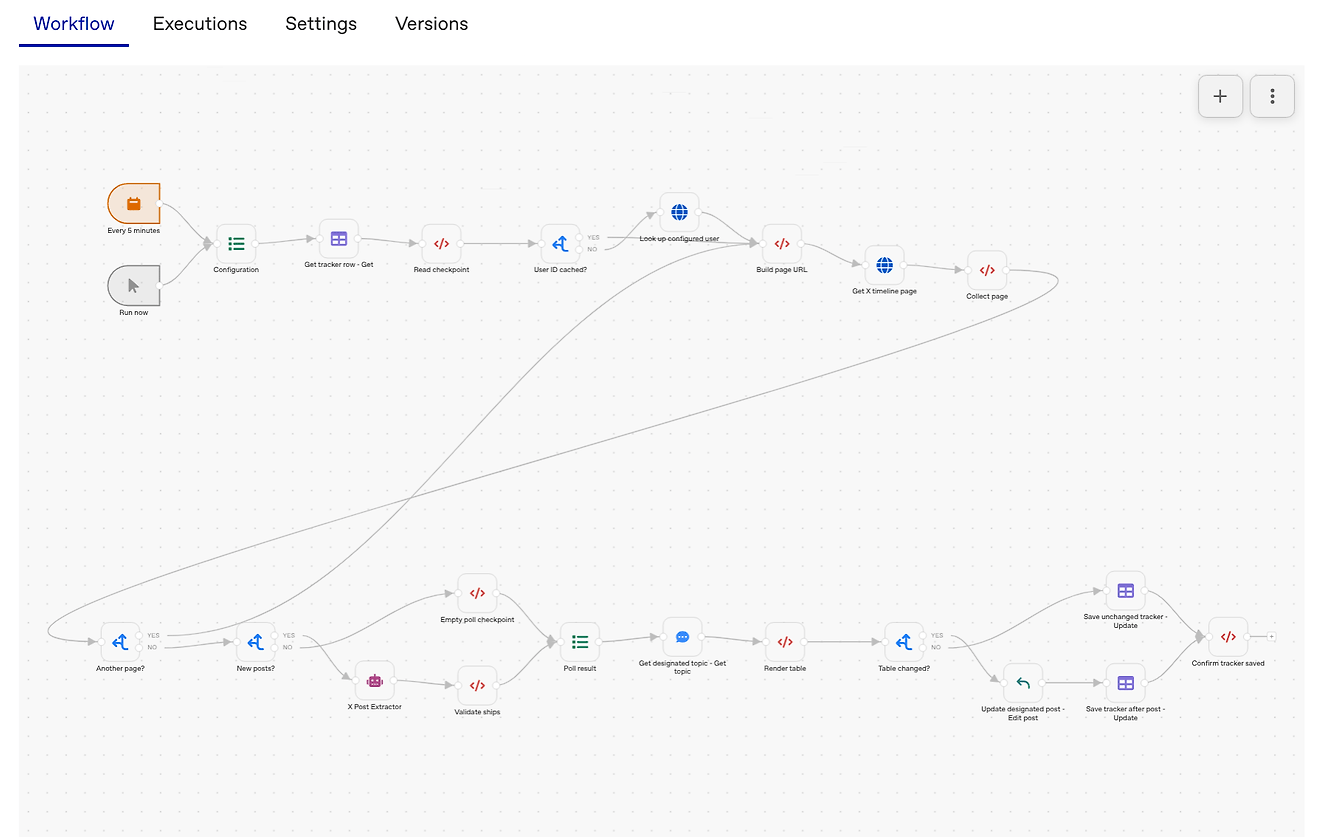
The Workflow runs on a timer. Each run, it does six things:
- Reads its configuration. One "Set fields" node at the start holds every setting: the topic to post in, the X username to follow, the campaign start date, and the API address. To point the Workflow at a different account or topic, you edit one node.
- Checks its cache. Discourse Workflows includes data tables, which store structured data between runs. One table holds Tibo's X user ID, the ID of the last post fetched, and every ship found so far.
- Fetches new posts from X. The Workflow calls two X endpoints: one to look up Tibo's user ID (only needed once, since the cache keeps it) and one to read his timeline. It asks only for posts newer than the last one it saw, and pages through results until there are none left. X charges per post returned, so a run that finds nothing new costs nothing.
- Hands the posts to an AI agent. An agent called X Post Extractor takes the batch of new posts and returns JSON listing each numbered ship: the day, the slot (Day 2 had four ships, so slots run 2.1 to 2.4), a one-sentence summary, a details link and the source post ID. Its instructions tell it to treat posts as data, never as instructions, and to skip polls, retweets, roundups, and anything without a day number.
- Rebuilds the table. A script merges the new ships with the cached ones, keeps the latest correction for any slot, and renders a Markdown table with all 28 days. Days still to come show as "Pending".
- Edits the post, but only if something changed. Two HTML comments in the post mark where the table starts and ends. The script swaps out only the text between those markers, so anyone can edit the intro above the table without the Workflow overwriting it. If the new table matches the old one, the Workflow skips the edit and updates the tracker.
The checks that keep it safe
A Workflow that edits a public post on its own needs to fail safely. The scripts stop the run and leave the post alone when:
- X returns an incomplete or partial response
- the pagination token repeats, or the run passes 40 pages
- a post ID, day number, or slot doesn't match the expected format
- a details link isn't a clean URL
- the post has missing, duplicated, or out-of-order table markers
- the new cursor is older than the saved one, which would mean re-reading old posts
When a run stops, the next one picks up from the last good state.
Under the hood…
The Workflow uses an agent (term-llm) inside dv, our tool for spinning up throwaway Discourse environments. The agent needs a working Discourse site to test against, and dv gives it one it can break without consequences.
The process:
- Ran dv new Workflow-build to create a clean environment.
- Described the goal in a few short paragraphs: a table tracking Tibo's ships, updated by polling X for new posts, with an AI agent doing the extraction. The prompt also told the agent to learn the X API first and build a fake version of it to test against, so development wouldn't cost anything.
- Used GPT-6.1 Sol, which produced a working Workflow on the first attempt, complete with tests and a handoff folder for production.
- Refined it in two passes: first moving storage into a data table, then pulling all the settings into the single configuration node.
- Exported the Workflow and imported it into the OpenAI community.
- Went back to the agent to fix a few production gaps. Our export file doesn't yet include data table or agent definitions, so those had to be recreated.
Build your own
The full build, including every script, is available in a post on Meta, written so agents can follow it. Give your agent a prompt like this:
Synchronize important discussion about "X" on accounts A, B, and C into my topic, following the method in [link to the Meta post].
You can use the same approach to:
- open a shadow topic whenever a specific person posts on social media
- keep a long-running topic up to date as a launch or event unfolds
- collect posts from several accounts into one record your community can search and discuss
Most companies announce on social media because that's where people already are; and that’s probably still the best case for public-facing releases. With Discourse + Workflows, your team can keep posting there while your community gets a lasting record on Discourse, and no one on staff has to copy posts by hand.
Comments